

How We Built Context Engineering for GTM: Time Series, Predictors, Plays, and the Next Best Action
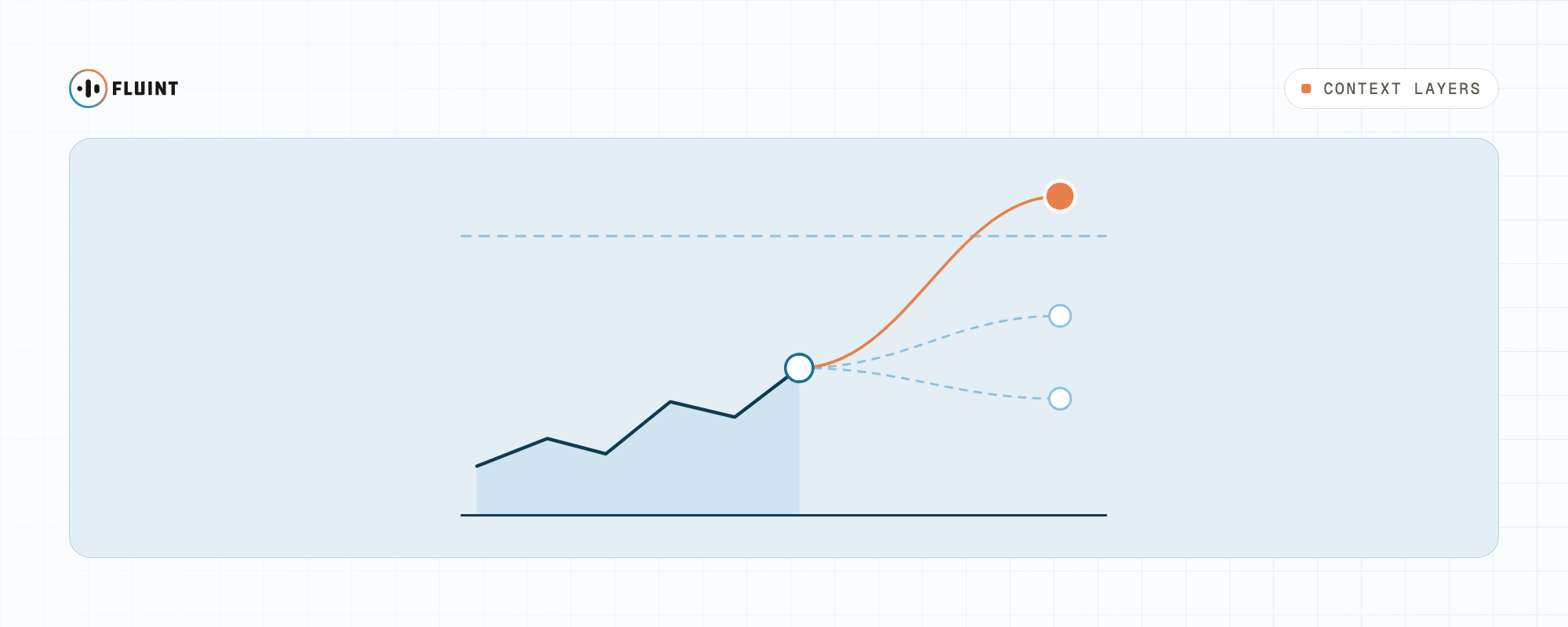



TL;DR
- There's no shortage of places to build a GTM agent, and there'll only be more. But every one of them hits the same limiter: whether the context underneath it knows which actions actually produce the outcome.
- Most teams define context as documents (ICP, personas, the playbook) in a knowledge base, or as a context graph that resolves entities so the data's accurate. Both are good starting points, and neither one tells an agent what to do next.
- Context engineering for GTM should start from the outcome. In complex deals, that outcome is stage-to-stage conversion, which gives you a much faster feedback loop than waiting on won or lost.
- Loop runs on four primitives: a time series of every deal, predictors scored at every date, plays weighted by their share of impact, and next_play, the next best action for each open deal.
- It's all pre-computed and served to your agents over MCP or API, every agent and rep action gets traced, and the model retrains as deals move. Which is why we call it Loop.
If you're a GTM engineer or in RevOps, and you're leading some kind of AI build right now, you've probably noticed the agent is the easy part.
Pick a platform, hook it up to your CRM, give it a prompt and a few tools, and you can have an agent running by Friday. Then you ask it the question that actually matters in a complex deal, something like what should we do next to get this deal from evaluation to proposal?, and it gives you an answer that sounds right. It might even be right, but nothing in your stack can tell you whether it is.
Which is the context problem. So I recorded a short walkthrough of how we're building GTM context at Fluint (the video above), and this post is the written version: two outside frameworks I really like, why most context projects stop short of what agents need, and a rundown of the primitives inside Loop, the learning engine we built to close that gap.
Where does GTM context fit in the AI agent stack?
GTM context is infrastructure. It sits underneath whichever agents you run, and it decides how well they do the job.
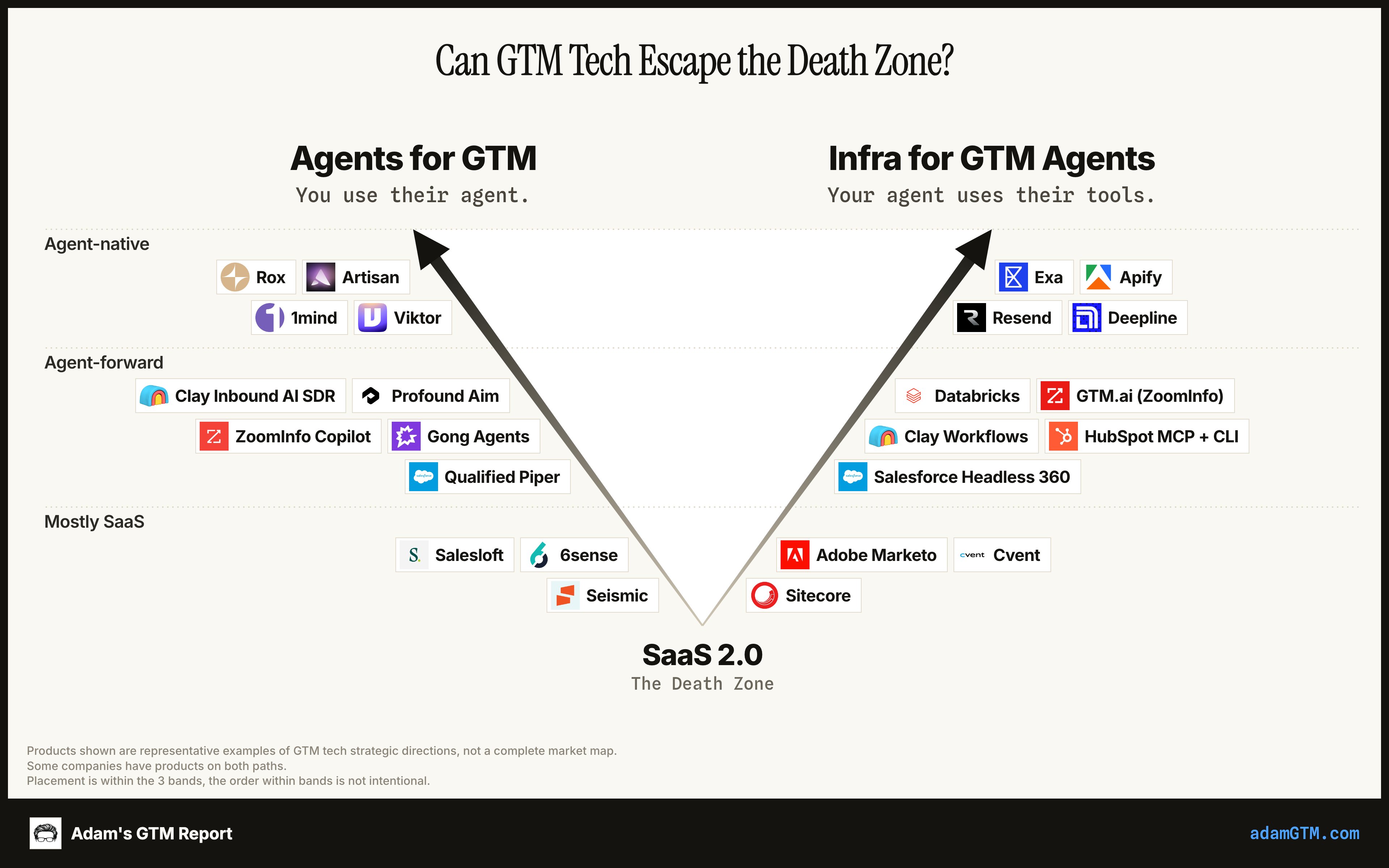
Adam Schoenfeld, who writes Adam's GTM Report (a fantastic newsletter), drew this out recently as a V. At the bottom sits what he calls the death zone, SaaS 2.0, meaning SaaS with a chatbox and MCP bolted on. And there are two ways out:
- Agents for GTM, on the left: you use their agent.
- Infra for GTM agents, on the right: your agent uses their tools.
My belief is the left side keeps multiplying. There'll be so many places to build and manage agents (there already are), which is fine. But all of them come back to the same issue: an agent that isn't built on the right context, meaning how the job actually gets done in a way that produces the outcome, is going to struggle to produce that outcome, and a new platform or a smarter model won't change that.
So we're heavily invested on the right side of Adam's chart, in the infrastructure agents need to do their job well, whichever agents you pick.
What context do AI agents need to run the next best action?
Context that's tied to outcomes. Agents need the plays your team runs and how your company specifically goes to market, plus a record of which of those actions actually caused deals to move.
Seth London, a GTM and AI leader at Meltwater who writes consistently about how they're building (a great follow), calls the end state of GTM "orchestrated next best action." In his version, people do what people are best at: talk to customers, be creative and apply judgment, and manage the agents, while goal-oriented agents take on everything else.
Now, look at what those agents need to get there. Seth's answer is complete context, which covers the jobs to be done, the plays and specific actions to run, and how your company goes to market (the part only your own people know). Then he adds the line I think matters most: every input, decision, and output gets logged, and those logs feed ML models that keep tuning how the work gets done.
Did you catch that? That last part is where most of the work is.
To feed a model, you have to trace which actions were taken and which outcomes they caused, so an agent's reasoning gets tied back to what objectively works for your team. Which makes it a data problem before it's an AI problem, because someone has to build the pipeline that feeds those models, and it's the piece a lot of teams have discounted.
Why isn't a knowledge base or a context graph enough?
Because neither one knows which action actually moves a deal forward. When most teams say "GTM context" today, they mean one of two things:
- Knowledge. Documents about who we believe our ICP is, our personas, messaging, and playbook, sitting in a knowledge base an agent can search.
- A context graph. Joining your data so it's accurate, by resolving entities, solving the identity problem, and stitching the same account, person, and meeting together across your CRM, calls, email, and calendar.
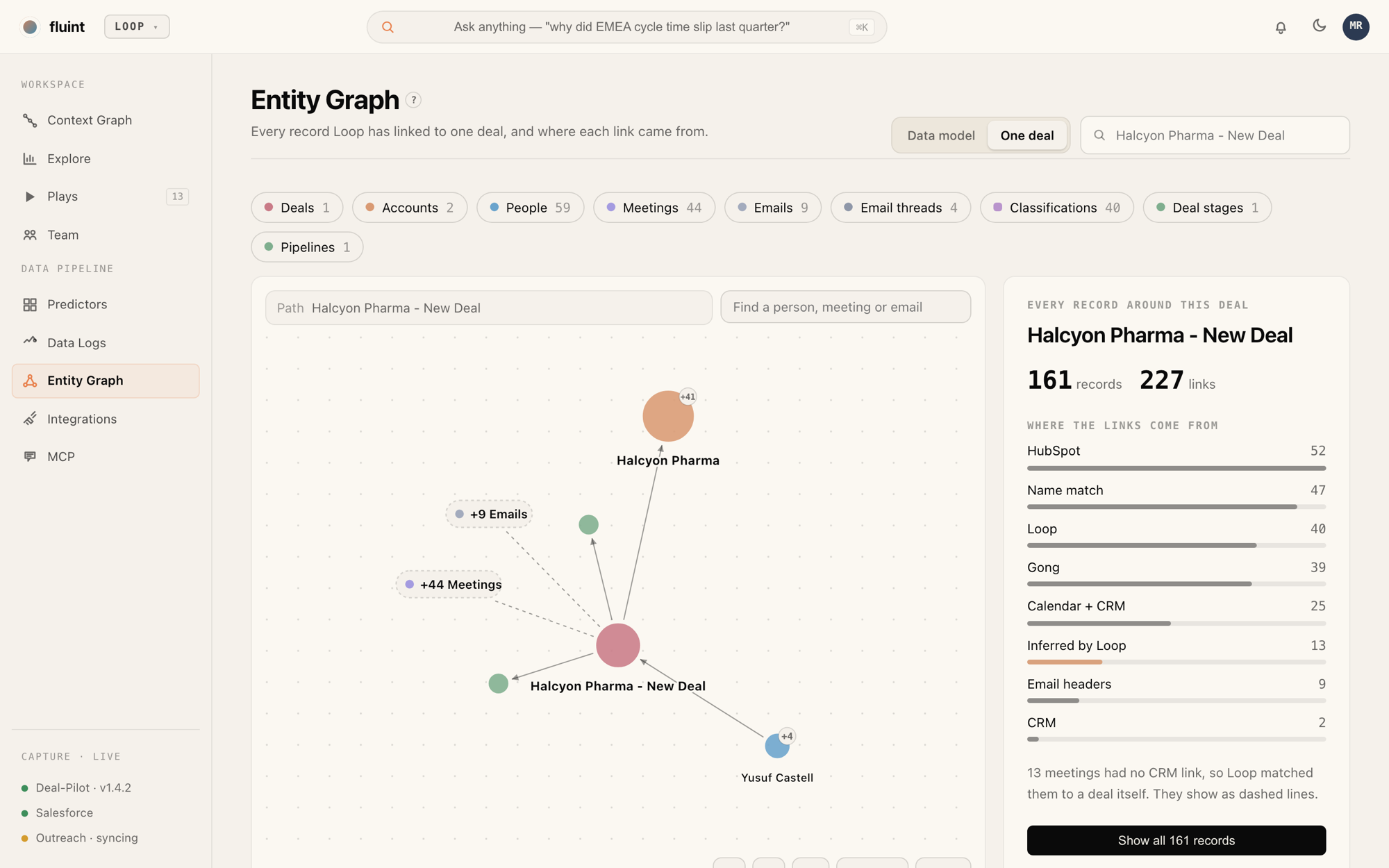
Both are worth having. We build a context graph too, and honestly, ours starts the same way everybody's does, since the first question is always the same: can we join the data accurately, so agents are at least pulling from the right records? That's a solid starting point.
But a knowledge base tells an agent what you believe works, and a graph tells it who's in the deal and what's happened so far. Neither one tells it which action, in this deal, at this stage, causes deals like it to move forward.
You mean like feeding all of it to an LLM and letting it figure out the pattern? An LLM will find signal in there, for sure, but it can't weigh that signal against what actually happened across your deals, and the weighing is the part your agents need most.
So we start from the other end. Context engineering, the way we do it, starts with the outcome and works backward to the actions that cause it.
Why start context engineering in the middle of the funnel?
Because that's where complex deals get won or lost, and it's where agents have the least proven context to work from.
Most GTM engineering today clusters at the top of the funnel, and it's easy to see why. The loop there is fast and fairly linear (did we book the meeting, did we get a reply?), there are a lot fewer variables, and the answer comes back in days.
The middle of the funnel is a wicked problem by comparison:
- A complex deal runs for months, so if you only learn at closed won or lost, you learn a few times a year.
- Over those months, reps (and now agents) run dozens of different behaviors across calls, emails, meetings, and the CRM.
- So a won or lost label can't explain each behavior's share of the impact.
- Which means you need a tighter loop, and the way to get one is to learn stage by stage.
So instead of asking "what wins deals," we ask a narrower question: what's the next action that lifts the health, or the trajectory, of this deal enough to cross the threshold where it converts to the next stage? You can check that answer every week, long before the deal ever closes.
(For what this means for how much of your GTM agents can own, that's The Context Line.)
What are Loop's four primitives?
Loop runs on four primitives: a time series, predictors, plays, and next_play. Each one answers a different question, and each one builds on the one before it.
| Primitive | What it is | The question it answers |
|---|---|---|
| Time series | Every deal, rebuilt as a versioned record you can replay as of any date | What was true about this deal, and when did it change? |
| Predictors | The deal signals that explain stage-to-stage conversion, scored on every deal at every date | What decides whether a deal converts at this stage? |
| Plays | The actions and sequences your reps and agents run, surfaced from your own data and weighted by impact | Which actions move the predictors that matter, and by how much? |
next_play | The next best action for one open deal, pre-computed and served over MCP or API | What should we do next on this deal? |
(If you'd rather build this yourself, the steps are in How to Build a Context Layer for GTM.)
1. Time series: every deal, rebuilt by date
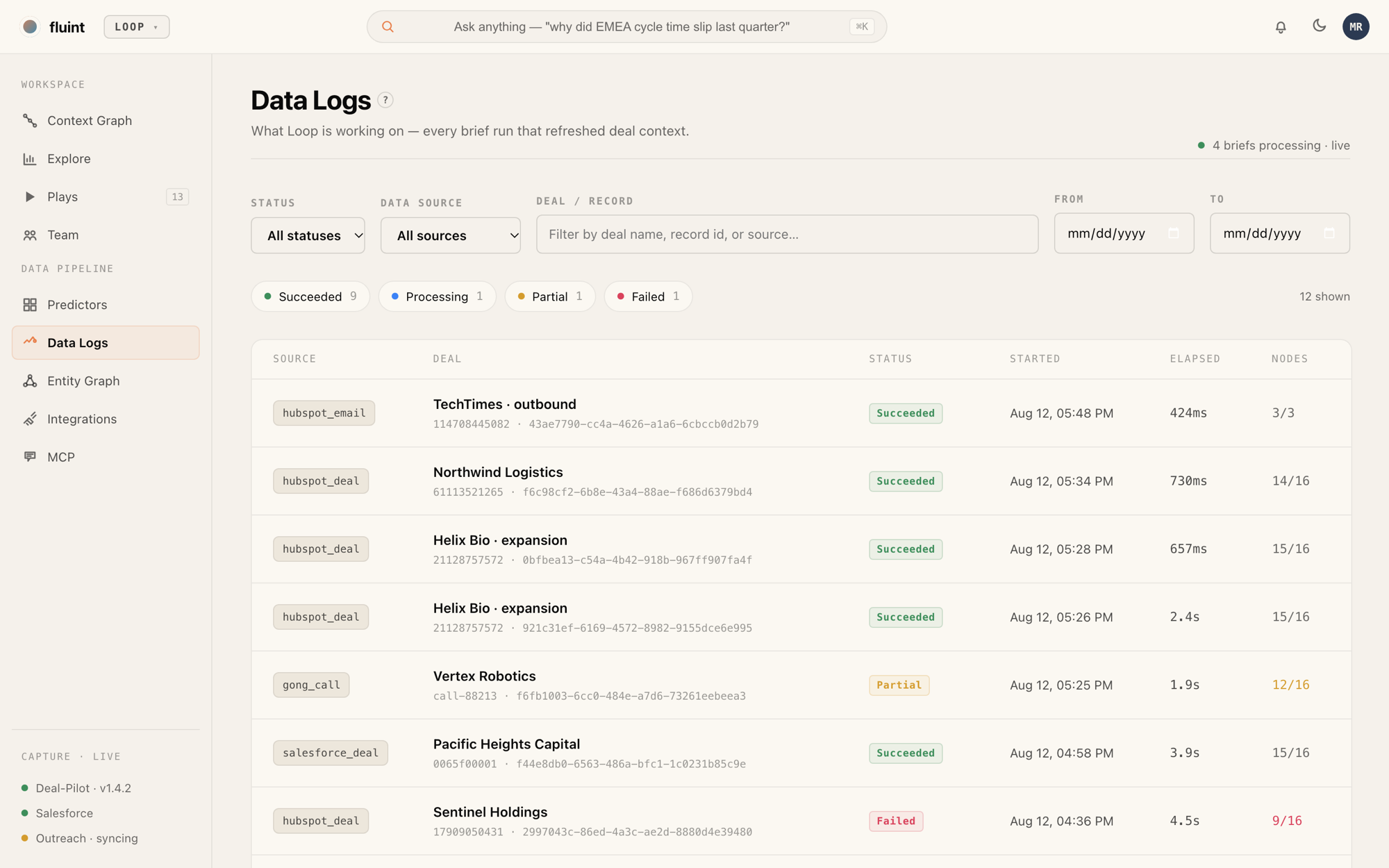
When we connect your data (Salesforce or HubSpot, Gong or Salesloft, email, calendar, and Snowflake), we pull your full CRM history and rebuild your whole GTM dataset, deals, emails, calls, and transcripts, as a time series that looks back 365 days. You can trace every run of it, too, in the Data Logs view above.
We structure it this way so we can see how each deal changed: when it got healthier or weaker, when it sped up or slowed down, and what was true about it at each of those moments.
By the way, this matters more than it sounds. Today's CRM record already holds the ending (the final stage, the real close date, the buyer who joined late), so a model trained on it borrows facts it never would've had mid-deal, looks smarter than it is, and then gets live deals wrong. Rebuilding each deal by date means every score only uses what was known that day.
2. Predictors: the deal signals that explain stage conversion
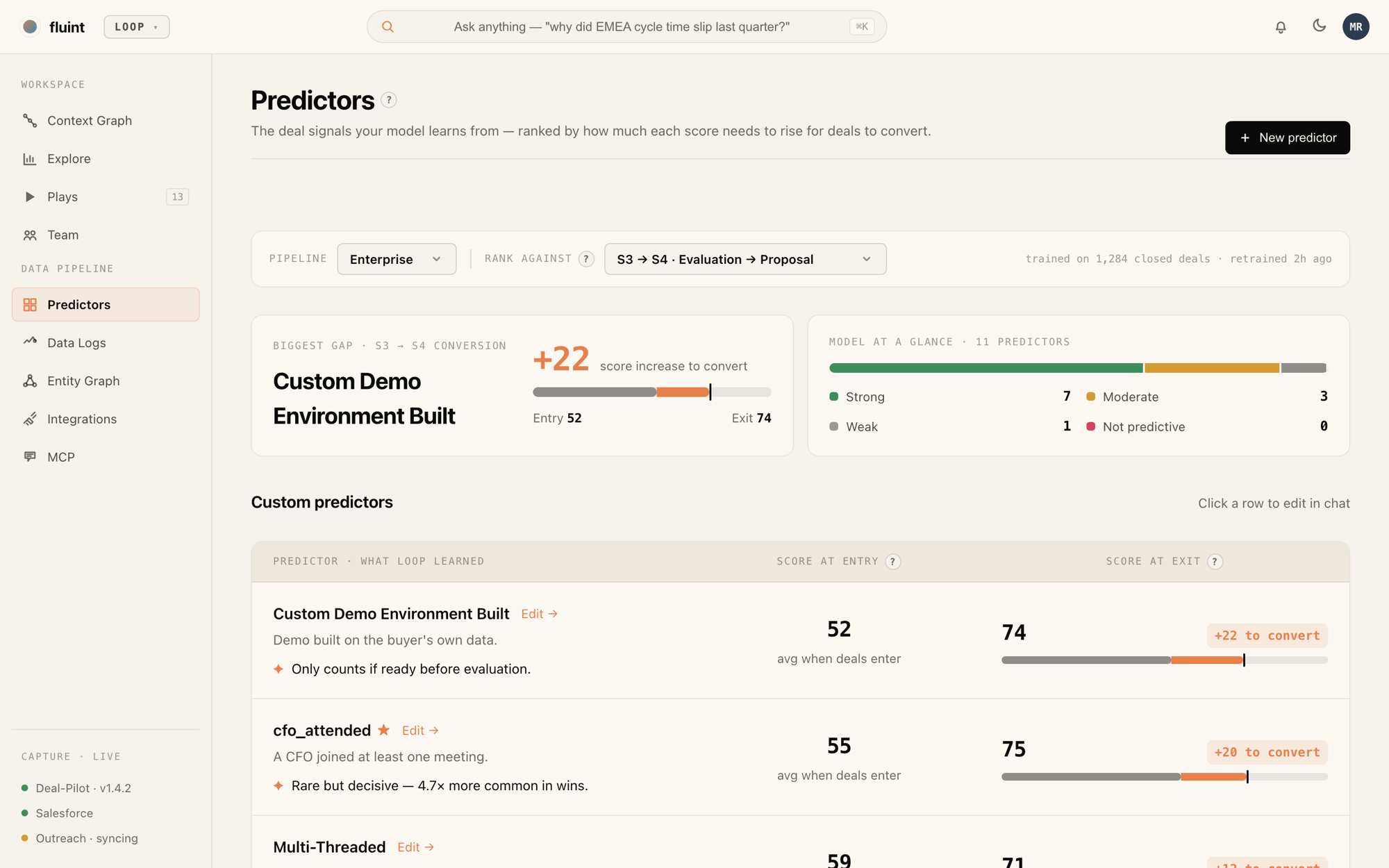
A predictor is an element of a deal that helps determine the outcome, and here the outcome is stage-to-stage conversion. Think the CFO joining a call, or a custom demo environment getting built before evaluation.
- Loop comes with a default set, and you can add your own, since your team will have signals that only matter to how you sell.
- Every predictor gets scored on every deal at every date, so you can see where it sat when a deal entered a stage and where it was when the deal left.
- And what matters shifts by stage. The same predictor carries a different weight as the buyer moves toward a decision, and each stage has a minimum score deals tend to need before they convert.
In MLOps terms, all of that labeling and tagging is a feature store, built for each customer from their own data. When a deal moves, we can see what changed in the data, and what drove it.
Which is also how you settle a bet. Say your team's debating whether to hire more sales engineers to build custom demo environments, the kind of call that usually goes to whoever argues best in the planning meeting. Set it up as a predictor instead, and you can run the math: does a custom demo environment actually change conversion, stage to stage, yes or no? (In the example workspace above, that score has to climb 22 points, from 52 to 74, before deals convert from evaluation to proposal.)
3. Plays: what your best reps actually do
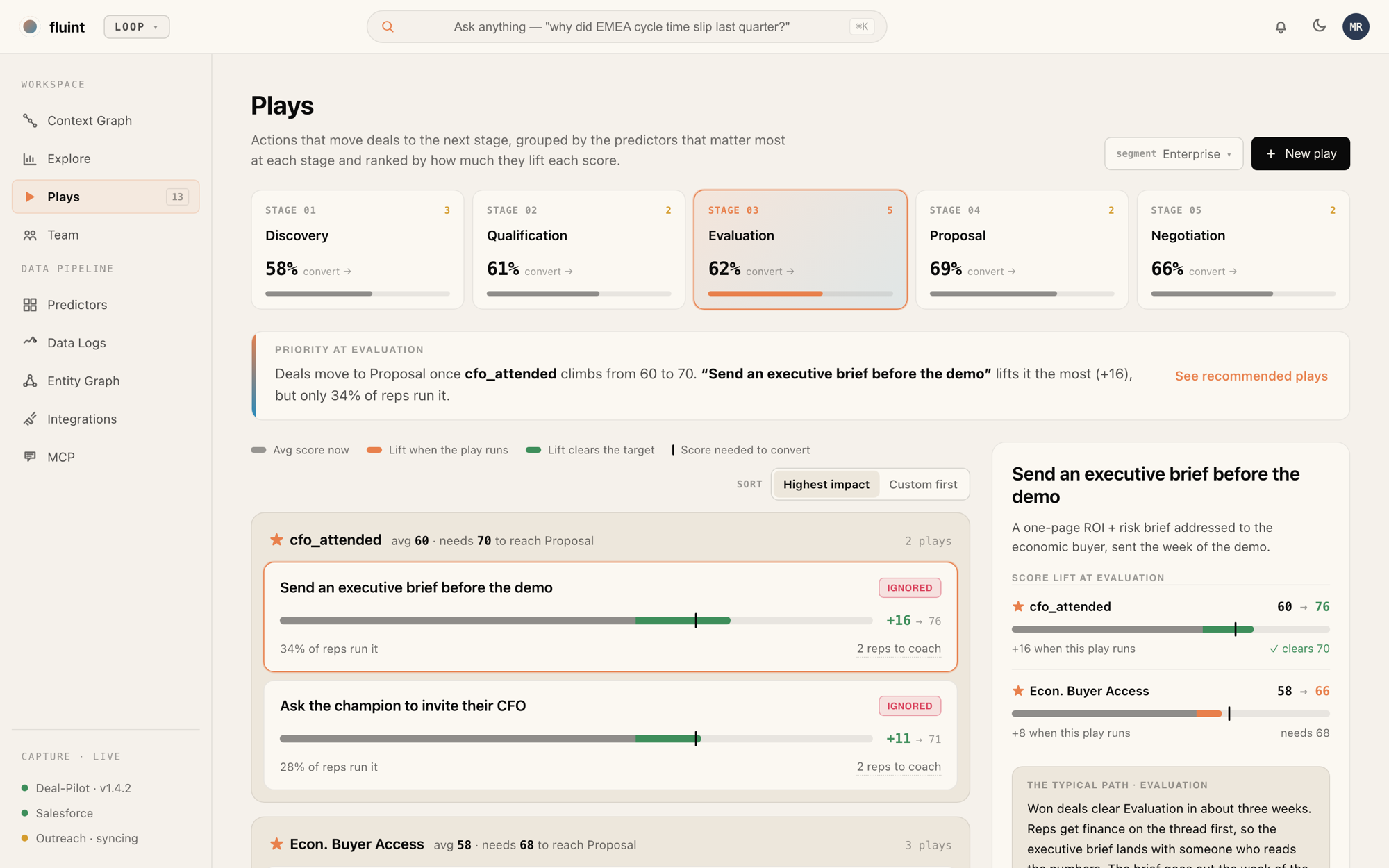
A play is an action, or a series of actions, that a rep or an agent runs on a deal.
What makes Loop's plays different is where they come from. We don't rely on you as an admin to decide the right action, or to build out another workflow. Loop surfaces plays from what your reps and agents are already doing, including the ones driving conversion that you may not even know about.
Each play comes with what it is and how it happens, in the kind of detail that usually lives in the heads of only a few reps. It shows the sequence too, meaning what lays the groundwork before it and what should happen next, along with the evidence: the actual examples from your deals it's based on.
Then every play ties back to the predictors it moves, weighted by its share of impact on stage conversion. That weighting matters, because most of what top reps do on deals that convert, they also do on deals that stall.
Take the example above. Sending an executive brief before the demo lifts cfo_attended by 16 points, enough to clear what deals need to reach proposal, but only 34% of reps run it. (I've written a whole framework on that play, so the 34% stings a little.) That's the kind of high-impact, rarely run play your agents should be pushing on every deal it fits.
4. next_play: the next best action for each open deal
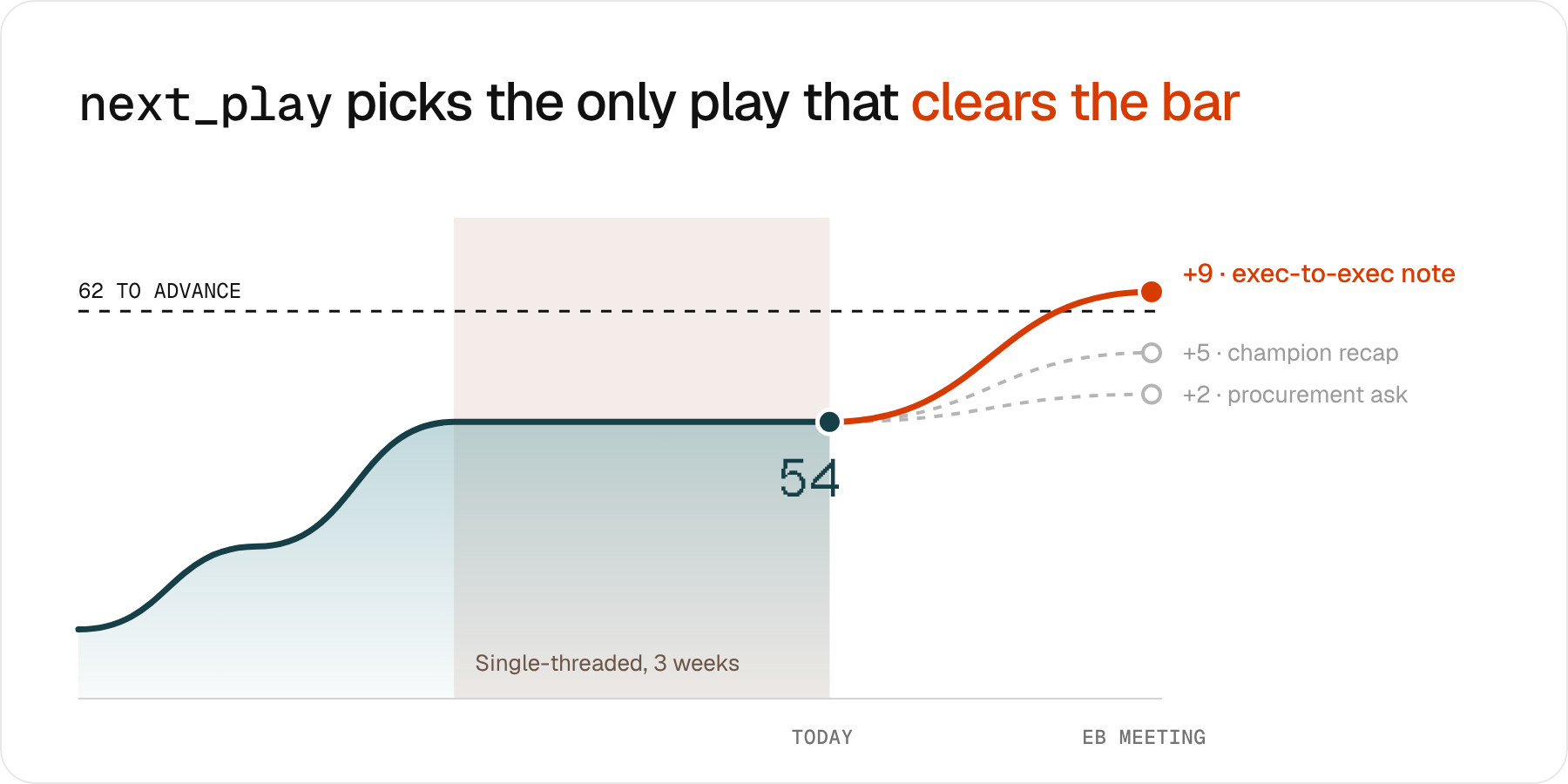
The right next best action is different for every deal, because what's happening in each one is different. That's why next_play works deal by deal: Loop reads the deal, scores it against your predictors and the stage minimum, weighs the candidate plays by their likely impact in that deal's situation, and picks one, with the evidence behind it.
It's all pre-materialized, meaning the context is computed ahead of time, so it comes back in about 1.5 seconds on average whenever an agent or a rep calls it.
And it shows up wherever you already work. Your agents get it over API or MCP, the Model Context Protocol, and it can sit as guardrails inside the LLM chats you and your reps are already having. Loop Console is the rollup, the pipeline-wide view of which plays are working at each stage, but nobody has to open another app to work a single deal.
So our point is pretty simple: go build agents, go work in an LLM, wherever you want. Loop is the one context call you need.
What happens after an agent or rep runs the next play?
Loop traces what happened, then retrains on it.
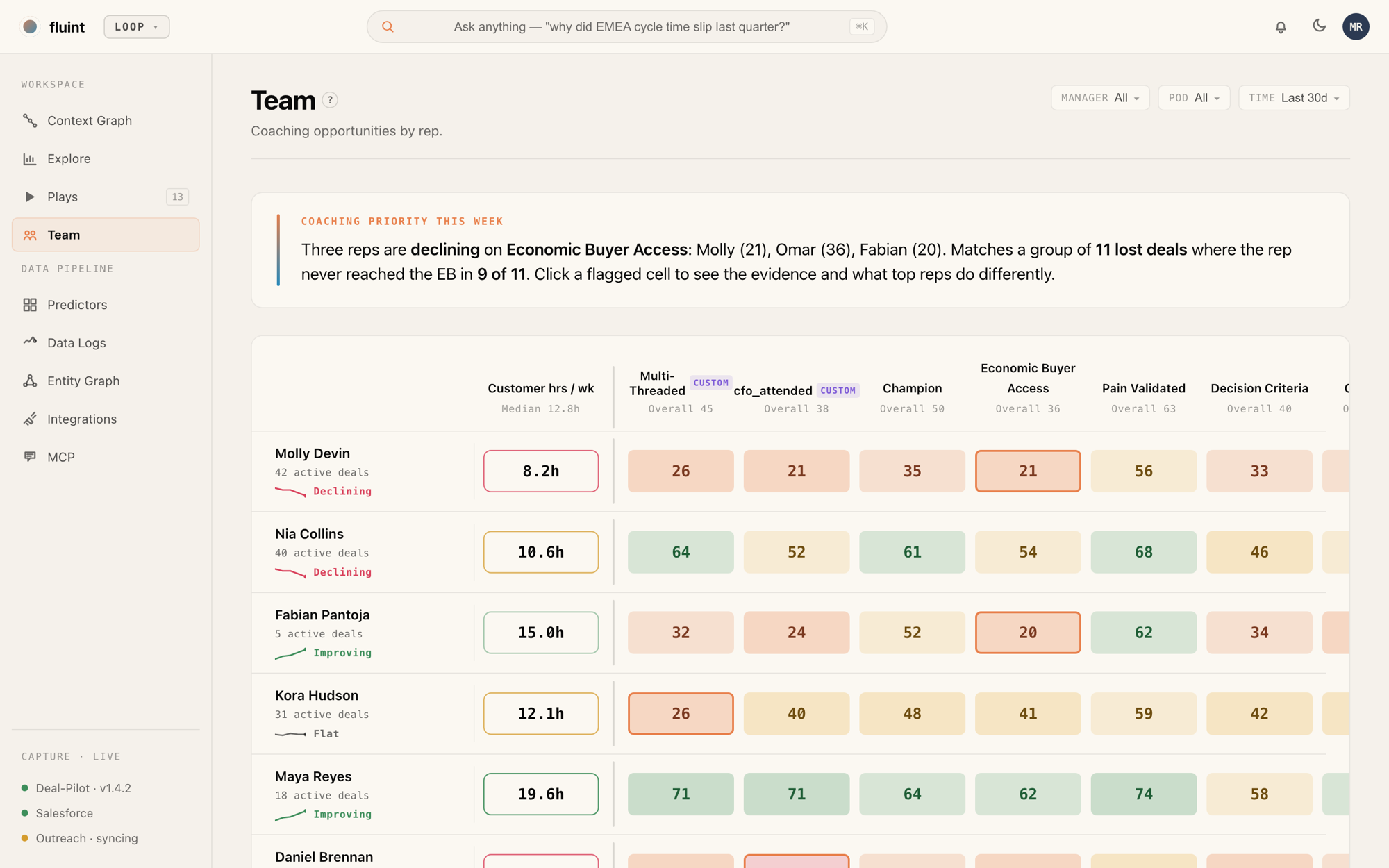
Every agent you run gets traced, so you can see what it actually did. And for frontline managers thinking about the human side, Loop shows how each rep is doing against the team average, predictor by predictor, which is only possible because the data lives in one place instead of in individual chat sessions nobody else can see.
Then every play that ran, and what the deal did next, goes back into the model and updates the weights before the next deal gets its pick. It runs on a continual loop, which is why we call it Loop.
So, end to end:
- Capture every change to every deal.
- Rebuild each deal by date.
- Score your predictors at every date.
- Measure what each stage takes to convert.
- Credit every play with its share of that movement.
- Serve
next_playto reps and agents. - Retrain as deals convert or close.
How can you test context engineering on your own data?
Run it live, on your own deals. If you're planning or building right now, you're probably weighing some tricky decisions, like whether this is the right thing to build around, and whether it'll actually explain, or even increase, your revenue impact.
We'll answer that with you on site, live, on your data. In one afternoon, we run your full dataset, rebuild the time series, show you your predictors, surface the plays you may be ignoring, and feed them to your agents the same day.
If that's interesting, let's jam on it: GTM Workshops.
FAQ's on:
Context Layers
It's building the context AI agents and reps need to make good go-to-market decisions. Fluint engineers it from the outcome, tracing which actions cause deals to convert at each stage, so agents act on what's proven for your team.
A context graph resolves entities and joins your data so it's accurate. The context layer is built on top of it and holds the learning: which plays move which predictors, and by how much, at each stage.
A predictor is a deal signal that helps explain stage-to-stage conversion, like the CFO joining a call. Loop scores every predictor on every deal at every date and weights each one by stage.
Loop surfaces plays from what your reps and agents already do on real deals. Each play shows how it happens, its sequence, and the deals it's based on, weighted by its share of impact on stage conversion.
Agents call next_play over MCP or API. It returns the play most likely to convert that deal at its current stage, pre-computed, in about 1.5 seconds on average.
Your CRM (Salesforce or HubSpot) plus calls and email (Gong or Salesloft), with Snowflake as an option. Loop pulls your full CRM history and rebuilds a 365-day time series, so it starts learning on day one.
Why stop now?
You’re on a roll. Keep reading related write-ups:
Deal-winning context that changes the outcome






“Fluint gave us months of AI engineering work with a single integration. Now everything we build is grounded in how we win, with the right context for every agent and seller.”

“Fluint keeps our team on our sales process and calls out the gaps in every deal. Our win rate is up, and it’s helped us 6x the efficiency of our sales organization.”

“No other platform captures the right context in fewer words than Fluint.”