
One source of trusted context
for every agent you run
Fluint turns your CRM, calls and email into context that's cleaned, scored against real outcomes and cited, then serves it to any model or tool over one MCP connection.






Every new AI tool wants its own connectors, and each one tells a different story.
Your team pays to pipe the same data into several tools, and when two agents disagree about a deal, nobody can say which one is right.
Connect once and use it everywhere.
Fluint handles the connectors and the cleanup. Claude, ChatGPT, your own agents and your CRM all read from the same place.
Every answer comes with its sources.
Each answer links back to the calls, emails and deal history behind it, so reps and leaders can check it before they act.
Spend less on overlapping tools.
One layer replaces the separate connectors each tool used to need, which lowers spend and keeps permissions in one place.
Key features in Fluint that make this work:

Serves cited context to any agent through one connection.
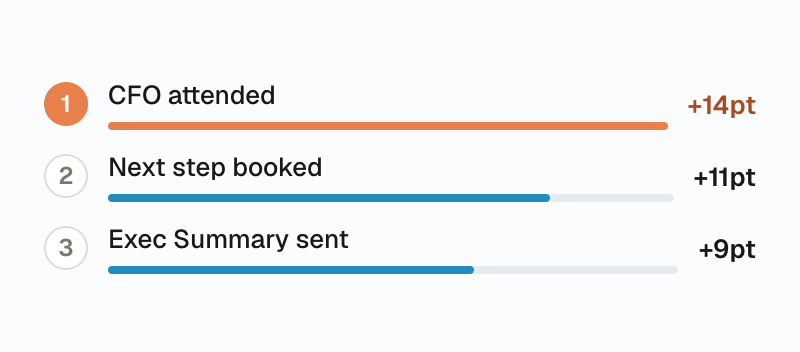
Measures how much each behavior raises your win rate.
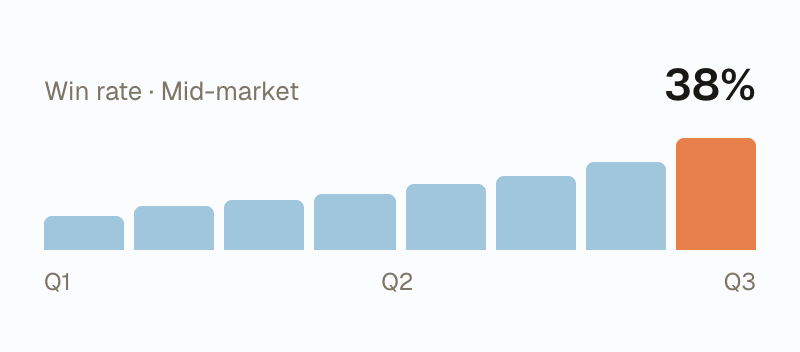
Browse your deal data, the model's reasoning and each team's results.
Common questions
What is MCP?
+
Model Context Protocol, an open standard that lets AI tools request context from a service like Fluint through one connection.
Which tools does it work with?
+
Any MCP client, including Claude, ChatGPT, Cursor and your own agents, plus Slack and your CRM.
Are we locked in?
+
No. Your data stays exportable, and MCP is an open standard that works across vendors.
Who can see what?
+
Access follows the permissions in your source systems, so reps only get context for the deals they can already see.
Find out what's working in your pipeline this week.
Start with 14 days free, worth up to $1,250. Connect Salesforce and your call recorder, and you'll see your first results in one session.